 FractalFlow
The schedule is the work.
FractalFlow is a Critical Path scheduler for Mac, iPhone and iPad. Calendars, constraints, float and earned value, computed by a real CPM engine on your device. Ten views, one plan. Risk on the same plan, with Monte Carlo that turns one date into a confidence level.
Free 14-day Studio trial, no purchase needed. One subscription covers Mac, iPhone and iPad.
Most project tools on a Mac draw the schedule. FractalFlow computes it.
Most project management on a Mac is a task list with a chart taped on. Dates are decorations. Float is a colour. Risk lives in a spreadsheet. FractalFlow is the other kind of product.
A real Critical Path engine
Every edit is rescheduled by a textbook CPM engine: working-time calendars, all eight constraint types, FS/SS/FF/SF links with time or percentage lag, total and free float, baselines, tracking, costs and earned value. Drag a bar and the network follows. The inspector tells you why a date landed where it did.
Ten views, one plan
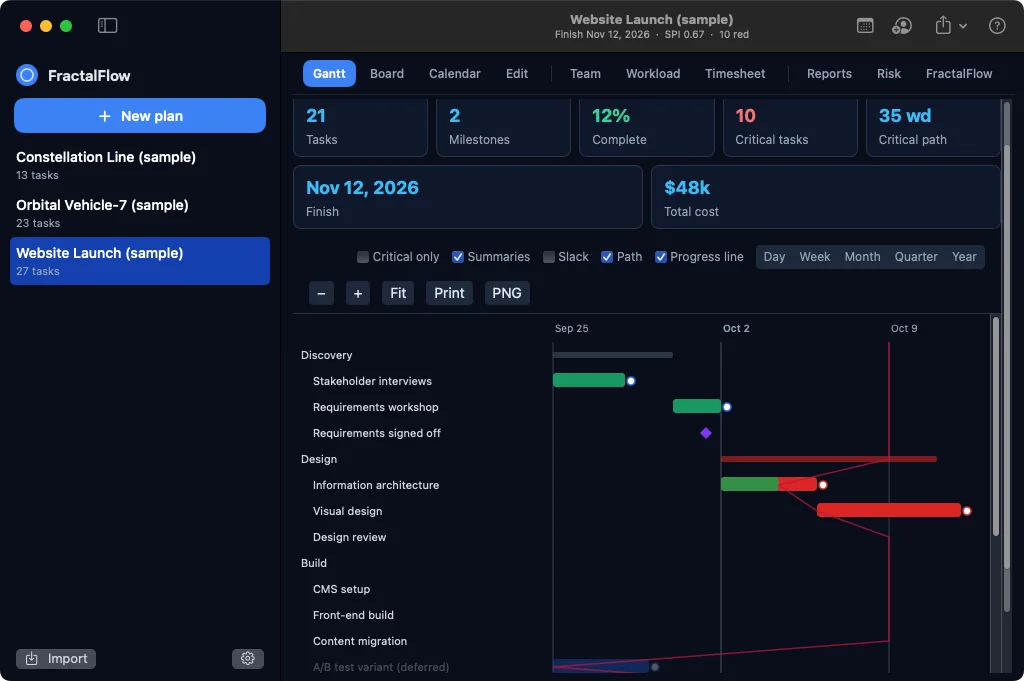
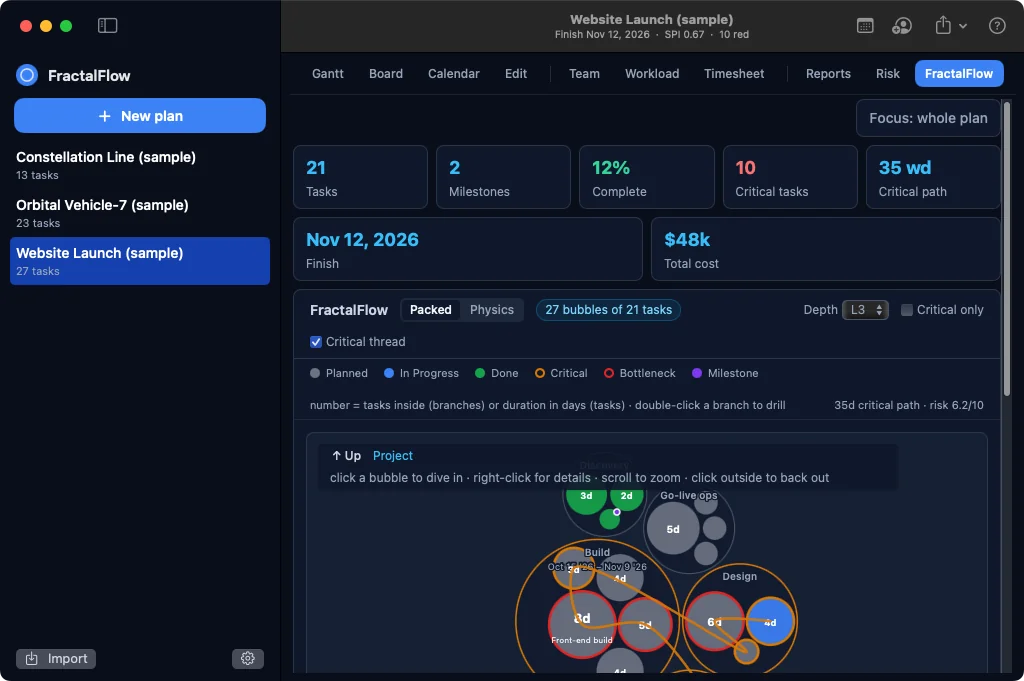
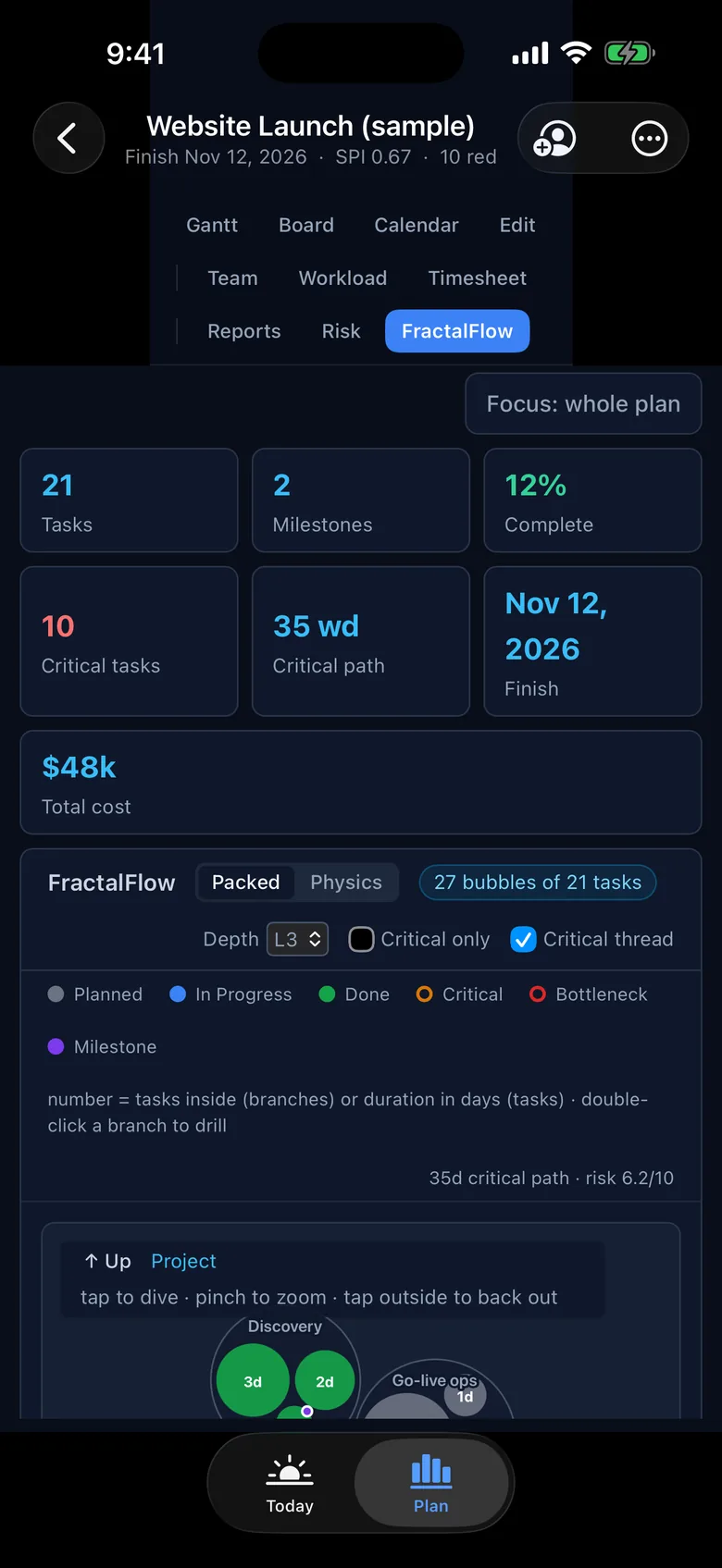
Gantt, Board, Calendar, Edit, Team, Workload, Timesheet, Reports, Risk and the FractalFlow network view. Switch freely; nothing is ever copied. The packed-circle network is not a toy: START and FINISH pin the critical thread through the whole plan.
Risk is a view, not an add-in
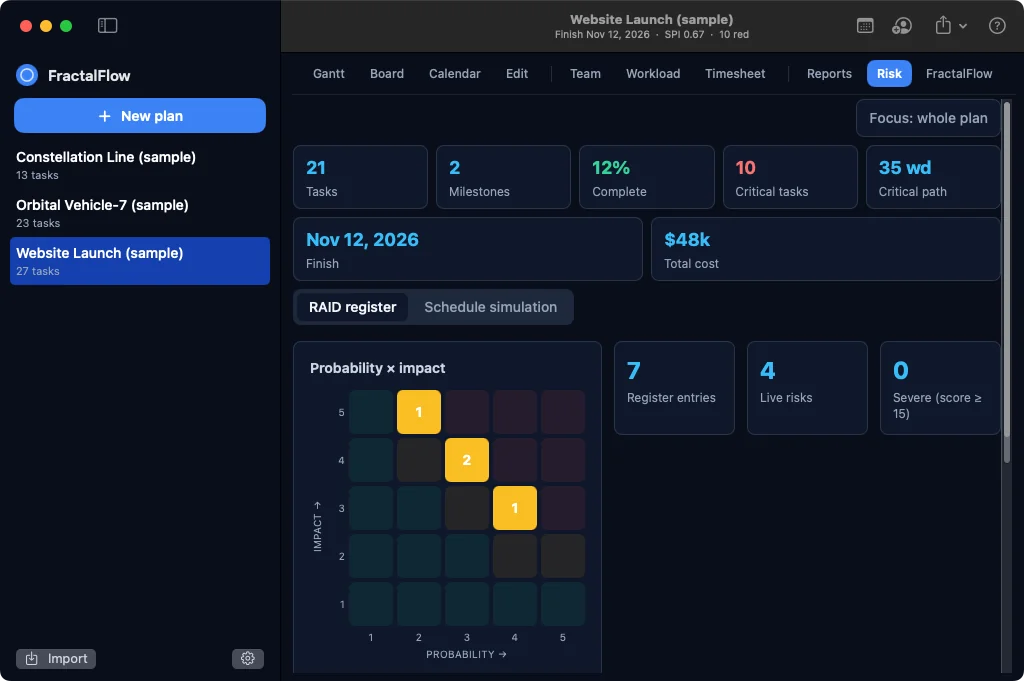
Studio runs a RAID register (probability × impact) and Monte Carlo (P50, P80, P90, criticality index, sensitivity tornado) through the same engine, in a worker, on the device. Where other tools offer this at all, it is a separate add-in.
Know the finish you can promise.
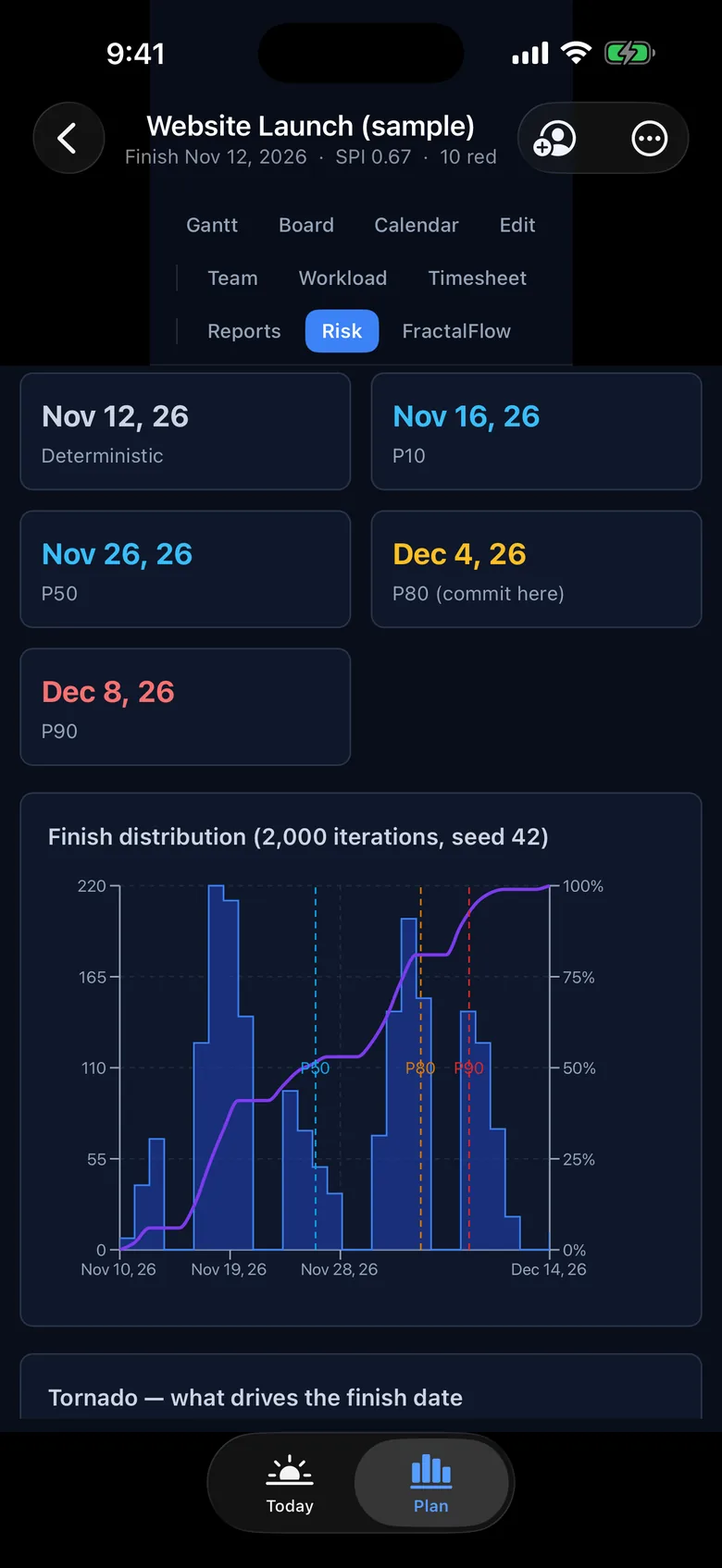
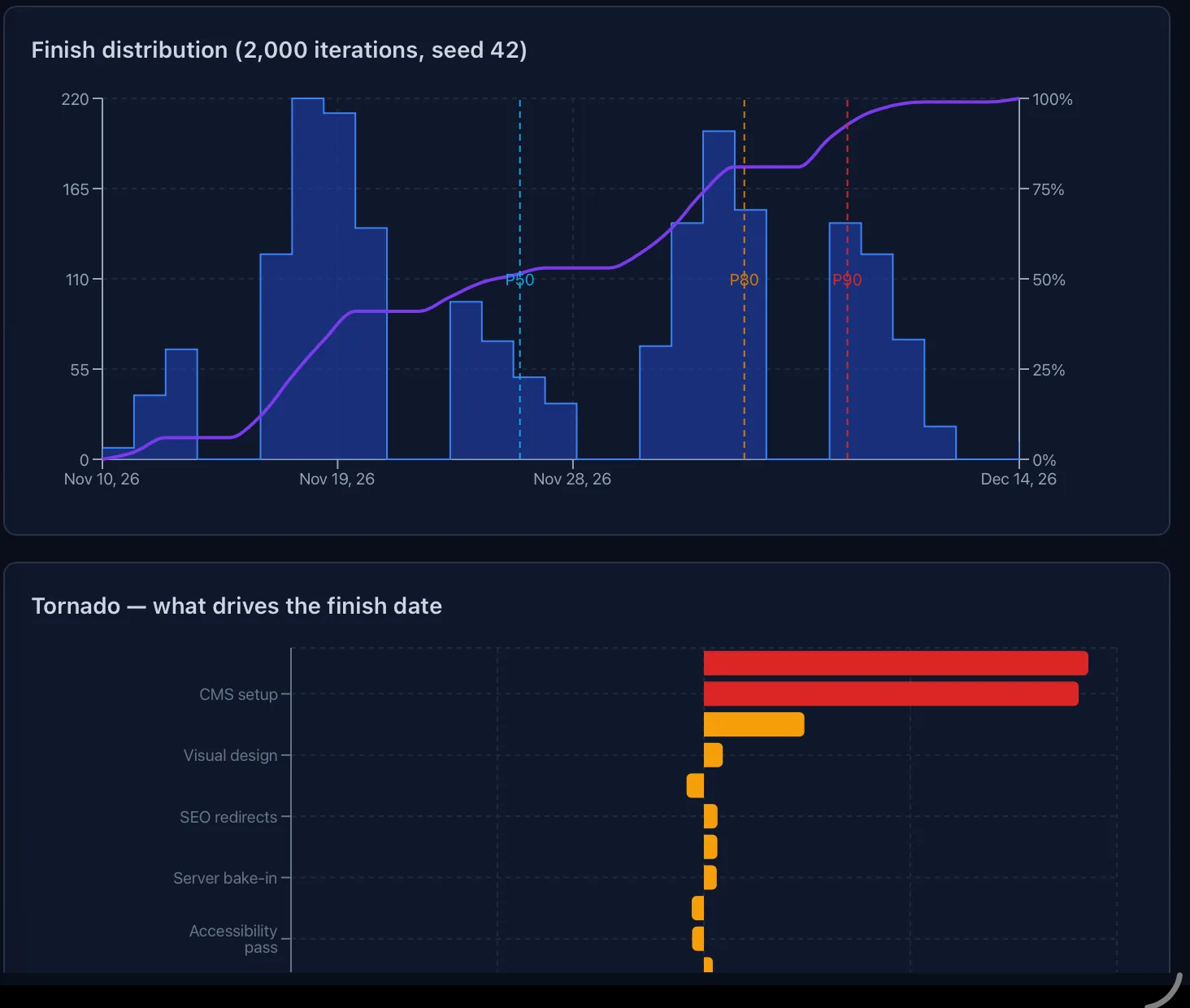
"We finish on November 12" is the date you get if nothing goes wrong. Monte Carlo runs your plan thousands of times on the device, using the estimate ranges and register risks you supply, and returns the P50, P80 and P90 finish, which tasks drive the spread, and how each risk moves the date.
Same seed, same result, so a forecast can be reproduced in the room. Three-point estimates per task, risks that fire probabilistically, a finish distribution with its cumulative curve, and a tornado that names the driver. It is the same CPM engine, not a separate model of the plan.
The RAID register keeps risks, assumptions, issues, dependencies and decisions on the plan, scored on a 5×5 matrix, linked to the tasks they threaten, and carrying a schedule impact the simulation can use.
Ten views. One plan.
Every view reads and writes the same model. Change a duration in the Gantt and the Board, the Reports and the FractalFlow network all move with it.
On iPhone, the same engine.
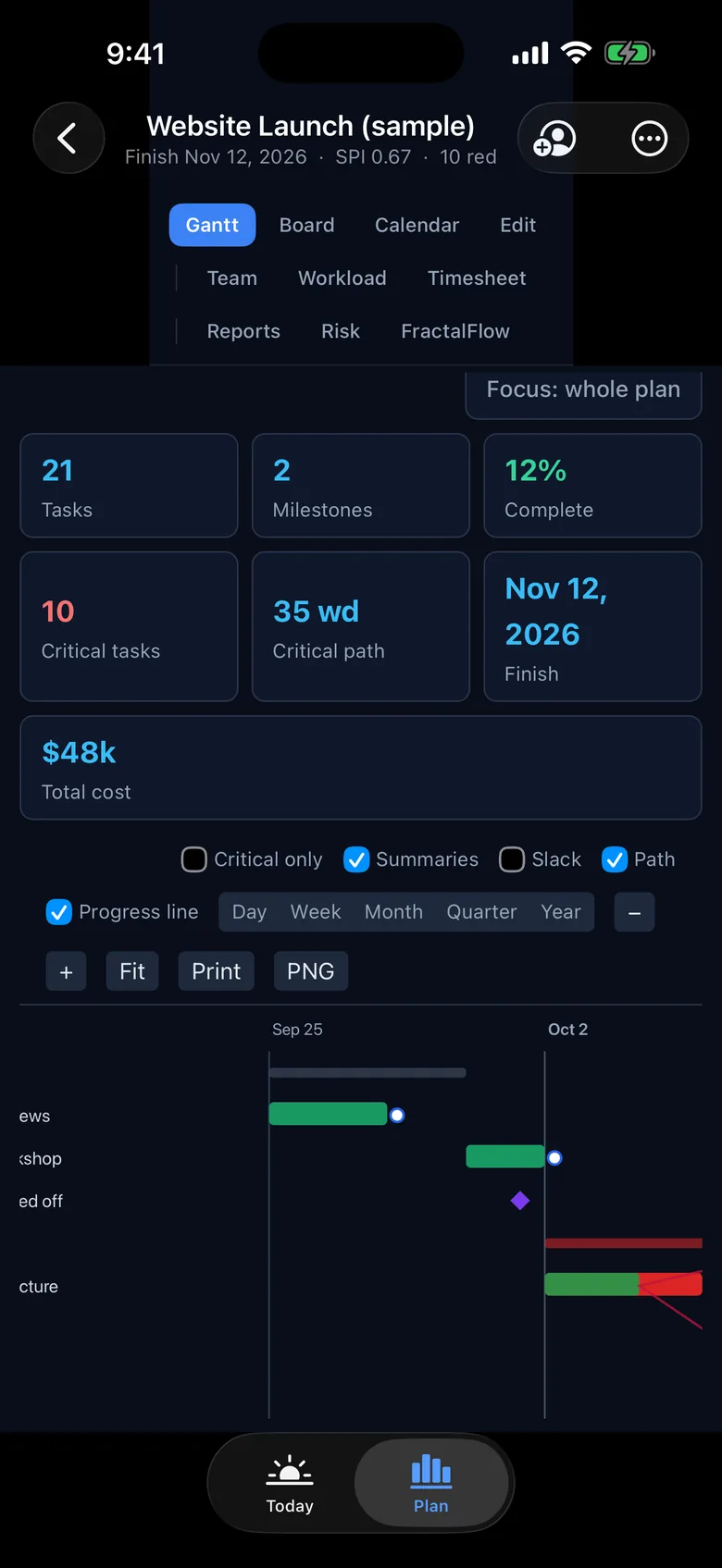
The full Critical Path engine, Monte Carlo included, runs on the phone. Nothing is sent anywhere to be computed. Turn on iCloud sync and the plan on your Mac is the plan in your pocket; on Studio, share a plan with the people you choose through iCloud.
Phones get a layout built for the small screen, with a Today view for the shift in front of you. iPad gets the full workbench with the sidebar and every view.
Works with the files you get.
Open Microsoft Project .mpp (2007 and later), Project XML and CSV. Export Project XML, CSV, a Gantt PNG, PDF, and editable PowerPoint decks (Pro). Plans are .ffplan documents you can mail to anyone with FractalFlow.
The .mpp reader is FractalFlow's own, parity-tested against MPXJ on a 2,000-task plan. FractalFlow never writes binary .mpp; Project XML is the interchange format Microsoft documents, and Project opens it directly.
Your plans stay yours.
Plans live on your device. Turn on iCloud sync to have them on your Mac, iPhone and iPad; it is off until you turn it on. Studio can share a plan with the people you choose, through your own iCloud.
Rizkin Labs runs no server for your plans and has no analytics or tracking. Not in the app, and not on this page. Subscriptions and payment are handled by Apple; we never see your card. Details are in the privacy policy.
Start with fourteen days of Studio, free.
The trial starts the first time you open the app. No purchase needed to start it, nothing charged when it ends. Afterwards, pick the plan that matches the work; one subscription covers Mac, iPhone and iPad.
When the trial ends without a subscription, FractalFlow keeps working as a viewer. Your plans stay on your device and in your iCloud: open, print and export them, and save copies. Edits are kept once you subscribe.
or $39.99 a year
- The scheduler. Critical Path engine, calendars, constraints, float
- Baselines, tracking, costs and earned value
- Nine views: Gantt, Board, Calendar, Edit, Team, Workload, Timesheet, Reports, FractalFlow
- Import .mpp, Project XML and CSV; export XML, CSV and Gantt PNG
or $79.99 a year
- Everything in Solo
- Resource leveling
- PowerPoint export with Deck Studio: native, editable slides
or $399.99 a year
- Everything in Pro
- Risk view: RAID register with the probability × impact matrix
- Monte Carlo schedule simulation: P50, P80, P90, criticality, tornado
- Share plans with other people through iCloud
What each plan includes.
The 14-day Studio trial includes everything. After it, Viewer keeps your plans readable, printable and exportable at no charge; Solo, Pro and Studio unlock the rest. A feature marked for Solo is also in Pro and Studio.
| Feature | ViewerFree after the trial | Solo$4.99 a month or $39.99 a year | Pro$9.99 a month or $79.99 a year | Studio$49.99 a month or $399.99 a year |
|---|---|---|---|---|
| Documents and files | ||||
| Open plans and .ffplan documents; plan library with startersThree starter plans: Website Launch, Orbital Vehicle-7, Constellation Line. | Included | Included | Included | Included |
| Save a Copy as .ffplan; Print and save as PDFGantt and FractalFlow print the chart; other views print a task list. | Included | Included | Included | Included |
| Export Project XML, CSV and Gantt PNGBinary .mpp is never written; Project XML is the interchange format. | Included | Included | Included | Included |
| New plan, edit, rename, DuplicateIn Viewer mode an edit is reverted and the paywall is shown. | Not included | Included | Included | Included |
| Import Microsoft Project .mpp (2007 and later), Project XML, CSVFractalFlow's own .mpp reader; password-protected files are refused. | Not included | Included | Included | Included |
| Export PowerPoint (Deck Studio)Native, editable slides, not screenshots. | Not included | Not included | Included | Included |
| Scheduling engine | ||||
| Critical Path engine: forward and backward pass, total and free float | Not included | Included | Included | Included |
| Working-time calendars with exceptions; project and task calendars | Not included | Included | Included | Included |
| All eight constraint typesASAP, ALAP, SNET, SNLT, FNET, FNLT, MSO, MFO. | Not included | Included | Included | Included |
| FS, SS, FF and SF links with time or percentage lag | Not included | Included | Included | Included |
| Auto and manually scheduled tasks; schedule from finish | Not included | Included | Included | Included |
| Milestones, deadlines, recurring tasks, task splits | Not included | Included | Included | Included |
| Move Project and Update Project | Not included | Included | Included | Included |
| Inspector: why a date landed where it didDriving predecessors, constraint, actuals, leveling delay. | Not included | Included | Included | Included |
| Tracking, cost and earned value | ||||
| Actuals, remaining work, percent complete, status date, Mark on Track | Not included | Included | Included | Included |
| Progress line on the Gantt | Not included | Included | Included | Included |
| Baselines | Not included | Included | Included | Included |
| Costs: rates, overtime, cost per use, fixed cost, rollups | Not included | Included | Included | Included |
| Earned value: SPI, CPI and the S-curve | Not included | Included | Included | Included |
| Timesheets that feed assignment actuals | Not included | Included | Included | Included |
| People | ||||
| Resources and assignments: work, material and cost | Not included | Included | Included | Included |
| Team Planner, Workload heatmap, task and resource usage | Not included | Included | Included | Included |
| Resource levelingPlan, Level Resources; clear leveling. | Not included | Not included | Included | Included |
| Views | ||||
| Gantt, Board, Calendar, Edit grid, Team, Workload, Timesheet, Reports, FractalFlowOne model; switching views never copies the plan. WBS Focus scopes every view to a subtree. | View only | Included | Included | Included |
| Risk viewThe tenth view: RAID register and schedule simulation. | Not included | Not included | Not included | Included |
| Command palette, keyboard shortcuts, first-run guide, in-app HelpMac: View menu switches views with Command-1 to Command-9. | Included | Included | Included | Included |
| Risk | ||||
| RAID register: risks, assumptions, issues, dependencies, decisionsProbability by impact matrix; risks link to tasks and carry a schedule impact. | Not included | Not included | Not included | Included |
| Monte Carlo schedule simulation: P50, P80, P90PERT-beta or triangular; seeded, so the same seed gives the same result. Runs on the device. | Not included | Not included | Not included | Included |
| Criticality index and sensitivity tornado | Not included | Not included | Not included | Included |
| iCloud and sharing | ||||
| iCloud sync of your own plans across Mac, iPhone and iPadOff until you turn it on in Settings. | Included | Included | Included | Included |
| View plans shared with you | Included | Included | Included | Included |
| Edit plans shared with youUpdates arrive when the plan opens, when the app comes to the front, or with Refresh from iCloud. Last save wins. | Not included | Included | Included | Included |
| Share a plan with other people through iCloudApple's own invite sheet; read-only or read-write per person. | Not included | Not included | Not included | Included |
Solo, Pro and Studio each work on Mac, iPhone and iPad under one subscription. Not in 1.0: writing binary .mpp, live co-editing with merge, Excel .xlsx export, a light appearance.
Prices in US dollars; Apple shows the equivalent price in your currency before you buy. Payment is charged to your Apple Account at confirmation of purchase. Subscriptions renew automatically unless cancelled at least 24 hours before the end of the current period; manage or cancel them in your App Store account settings. Every plan can open, print and export plans, sync its own plans through iCloud, and view plans shared with it. Terms of Use.
Against the schedulers people actually use on a Mac.
Two of these are serious Apple-native schedulers, one is Microsoft Project files on a Mac, one is Microsoft's own desktop product, and one column stands for the work-management apps that draw a Gantt. FractalFlow's difference is the combination: a textbook engine plus RAID, Monte Carlo, earned value and editable PowerPoint, on Apple devices, at a price a single planner can pay.
Swipe sideways for the other columns.
| Feature | FractalFlowMac, iPhone, iPad | OmniPlan 4The Omni Group | Merlin ProjectProjectWizards | Project Plan 365Housatonic | Microsoft ProjectDesktop, Windows | ClickUp, Asana, mondayWork-management apps |
|---|---|---|---|---|---|---|
| Critical Path engine with floatForward and backward pass, total and free float, not a coloured chain of bars. | Yes. Solo and up | Yes. | Yes. | Yes. | Yes. | Partly. Highlighted chain on paid tiers |
| Working-time calendars with exceptions | Yes. Project and task calendars | Yes. | Yes. | Yes. Base calendars | Yes. | No. Weekends at most |
| All eight constraint types, time or percentage lag | Yes. Solo and up | Partly. Start and end constraints, lag | Partly. Constraints and lag | Yes. Project-style constraints | Yes. | No. Dependencies only |
| Resource leveling | Yes. Pro and up | Yes. Every tier | Yes. Auto-leveling | Yes. | Yes. | No. |
| Earned value: SPI, CPI, S-curve | Yes. Solo and up | Yes. Pro only | Yes. Merlin Project, not Express | Yes. Earned value report | Yes. | No. |
| RAID register with a probability by impact matrixRisks, assumptions, issues, dependencies and decisions on the plan, scored and linked to tasks. | Yes. Studio | No. | Partly. Risks as attachments | Partly. A risk level per task, Business plan | No. | Partly. Templates, not a scored register |
| Monte Carlo schedule simulationP50, P80, P90 finish, criticality index, sensitivity tornado. | Yes. Studio | Yes. Pro only; milestone confidence | No. | No. | Partly. Third-party add-in, sold separately | No. |
| Native, editable PowerPoint exportSlides built from shapes and charts, not a screenshot. | Yes. Pro and up | No. Images, PDF, CSV | No. Images, PDF | Partly. Statistics to a PPT file; Windows and web only | Partly. Timeline copied as a picture | No. |
| Opens Microsoft Project .mpp | Yes. Solo and up; 2007 and later | Yes. Pro only | Yes. 2003 to 2016 | Yes. Native | Yes. Native | No. CSV or Excel import |
| Writes binary .mppFractalFlow writes Project XML, which Microsoft Project opens directly. | No. Project XML instead | Yes. Pro only | No. Project XML instead | Yes. Native | Yes. Native | No. |
| Same engine on the phone | Yes. iPhone and iPad | Yes. iPhone, iPad, Vision Pro | Yes. iPhone, iPad, Vision Pro | Yes. iPhone and iPad | No. Windows only; Planner on the phone is not the desktop engine | Yes. Task apps |
| Plans are files you own, offline | Yes. .ffplan; iCloud sync is opt-in | Yes. | Yes. iCloud Drive or Dropbox sync | Yes. .mpp | Yes. .mpp | No. Cloud accounts |
| PriceUS list prices at the time of checking. | Solo $4.99, Pro $9.99, Studio $49.99 a month; yearly $39.99, $79.99, $399.99; free Viewer after the trial | Standard $199.99 or Pro $399.99 one-time; Pro $199.99 a year | Mac $22.99 a month; iPad and iPhone $9.99; Express $6.99; free viewer after the trial | About $10 to $18 a month | Standard 2024 $679.99; Professional 2024 $1,129.99 one-time | $7 to $25 per user a month |
Checked against each vendor's published documentation and price lists on September 30, 2026; features and prices change, and the makers of these products have not reviewed this table. Corrections to hello@rizkinlabs.com. OmniPlan, Merlin Project, Project Plan 365, Microsoft Project, ClickUp, Asana and monday.com are trademarks of their respective owners; FractalFlow is independent of all of them.
I spent my career in CMC program management across small molecules, biologics and cell therapy, coordinating dozens of concurrent projects across more than a dozen functions, usually without anyone reporting to me. The schedule was the only authority I had, and the tools kept drawing it instead of computing it. FractalFlow is the scheduler I wanted in every program I ran. It is a general scheduler, tested against the hardest plans I know. Benjamin Rizkin, PhD · Rizkin Labs
NWP-417 is a fictional small-molecule program from end of Phase 2 to NDA submission and inspection readiness: 35 tasks, seven owners, a CDMO batch slot that cannot move, an FDA meeting date that belongs to FDA, and a nitrosamine finding that added 14 days to the purge study.
The deterministic plan says inspection-ready on May 19, 2028, with the NDA six days past its deadline. Two thousand runs later, the date you can commit to at P80 is September 13. The tornado puts 12-month drug product stability at the top, which is exactly where an experienced CMC lead would have looked first. The difference is that now the plan says it too, in a form you can take into the room.
The program is fictional. 2,000 iterations, seed 42. Schedules and forecasts are estimates produced from the data entered.
Looking for the browser version?
The free browser app that used to live at this address has been retired. FractalFlow now ships as a native app for Mac, iPhone and iPad, with the same engine and a great deal more. Plans you saved in the browser version stayed in that browser's local storage and were never sent to us; if you need help with them, write to hello@rizkinlabs.com.